
VoltPro vs Spreadsheets
Your math is solid. Your proposals should show it.
Keep estimating the way you estimate. Import your spreadsheet, see your profit, and send a branded PDF. All in the same workflow.
Opens ChatGPT in a new tab.
Quick answer
Choose VoltPro if you estimate in a spreadsheet and want to use assemblies or create professional branded proposals with profit visible before you send. Keep the spreadsheet for the math.
A spreadsheet is fine for rough internal calculations you never send to a client.
How they compare
What you get with each
| Spreadsheet + Word/Docs | VoltPro | |
|---|---|---|
| Import your existing spreadsheet | Duplicate or copy & paste | CSV import. Line items become an estimate in minutes |
| Branded PDF proposal | Manual formatting, inconsistent results | Professional branded PDF, multiple templates |
| Profit visibility before you send | Formula you hope is right | Real-time margin displayed as you build |
| Version control | estimate-v3-FINAL-USE-THIS.xlsx | Every version saved, named, searchable |
| Change orders | Duplicate the sheet, delete, re-export | One click. New PDF with change log. Project totals tracked |
| Searchable job history | Folders and email threads | Every proposal searchable by customer, number, name |
| Markup vs margin check | Manual calculation | Margin shown in real time. No mental math |
| Labor calculation | Guesswork or manual formula per line | Labor line items built in, visible by section |
| Mobile use | Borderline. Spreadsheet apps are limited | Full workflow on phone: build, review, send |
| Cost | ~Free | From $0. Paid plans from $29/month |
Import your existing spreadsheet
- Spreadsheet + Word/Docs
- Duplicate or copy & paste
- VoltPro
- CSV import. Line items become an estimate in minutes
Branded PDF proposal
- Spreadsheet + Word/Docs
- Manual formatting, inconsistent results
- VoltPro
- Professional branded PDF, multiple templates
Profit visibility before you send
- Spreadsheet + Word/Docs
- Formula you hope is right
- VoltPro
- Real-time margin displayed as you build
Version control
- Spreadsheet + Word/Docs
- estimate-v3-FINAL-USE-THIS.xlsx
- VoltPro
- Every version saved, named, searchable
Change orders
- Spreadsheet + Word/Docs
- Duplicate the sheet, delete, re-export
- VoltPro
- One click. New PDF with change log. Project totals tracked
Searchable job history
- Spreadsheet + Word/Docs
- Folders and email threads
- VoltPro
- Every proposal searchable by customer, number, name
Markup vs margin check
- Spreadsheet + Word/Docs
- Manual calculation
- VoltPro
- Margin shown in real time. No mental math
Labor calculation
- Spreadsheet + Word/Docs
- Guesswork or manual formula per line
- VoltPro
- Labor line items built in, visible by section
Mobile use
- Spreadsheet + Word/Docs
- Borderline. Spreadsheet apps are limited
- VoltPro
- Full workflow on phone: build, review, send
Cost
- Spreadsheet + Word/Docs
- ~Free
- VoltPro
- From $0. Paid plans from $29/month
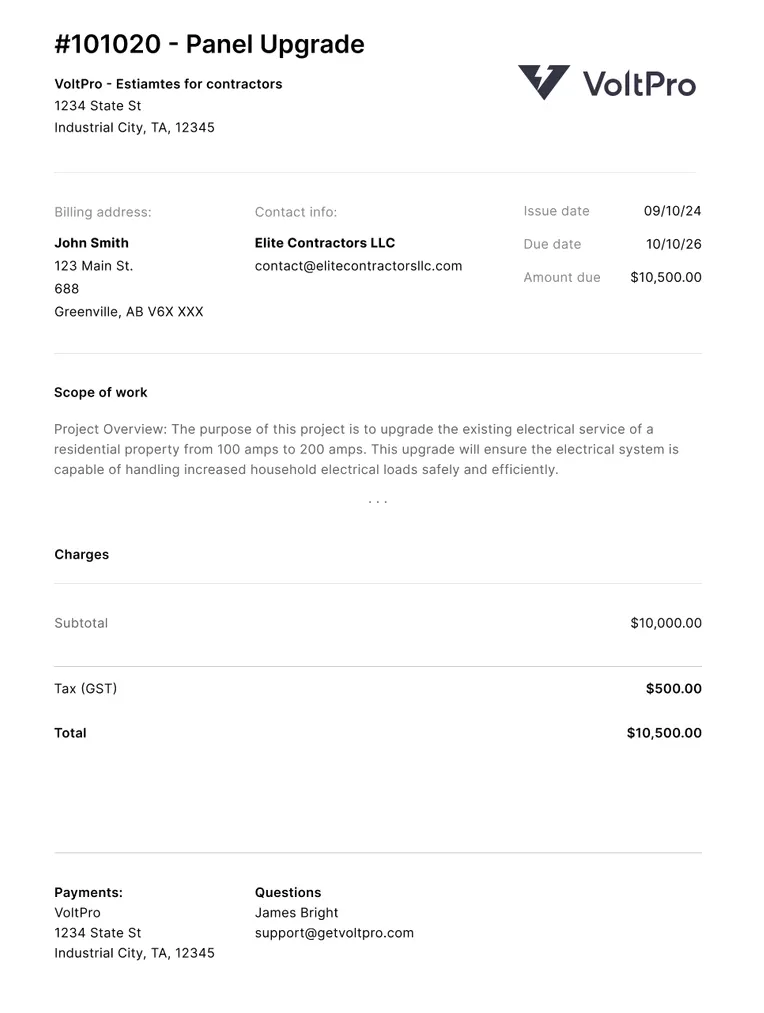
Your proposal should look as good as your work.
The PDF is the first thing the customer sees. A raw spreadsheet export doesn't match the job you priced.
- Logo, scope, line items, signature block. Every time. No reformatting.
- The number is right. The document should match.
Know your profit before it's too late to change it.
Import a spreadsheet, margin appears. Add a line item, margin updates. Before you send, the number is there.
- Stale formula? You find out after the job. By then it's gone.
- Labor rate went up? VoltPro catches it. Spreadsheet doesn't.
Stop rebuilding the same estimate from scratch.
Every estimate searchable. Every past job duplicatable in a click.
- No more "v3-FINAL-use-this.xlsx" folder archaeology.
- Change order? One click. New PDF. Original alongside it.
Estimate even faster.
Build material assemblies that you add to your estimates.
- Group parts into re-usable assemblies to build complex estimates in seconds.
- Don't do the math manually. Enter the square footage, and VoltPro automatically calculates the exact material quantity required.
How it works
From spreadsheet to sent proposal in three steps.
Step 1
Import your estimate
Bring your existing estimate or build it right in VoltPro.
Step 2
Generate a professional proposal
A branded PDF with your logo, scope, and terms. Client-ready in minutes.
Step 3
Every bid, right where you left it
Every bid saved. Profit tracked. Your next estimate starts faster than the last.

An honest take
When you should stick with a spreadsheet
A spreadsheet is fine if:
- The numbers stay internal. No customer ever sees the document.
- You want full formula control with no client-facing output.
- You estimate a handful of jobs per year and a polished proposal isn't a priority.
Sending to customers or GCs, even one a month? The spreadsheet output is costing you credibility you've earned on the job.
I'm a lot more confident sending bids now. Before VoltPro I was using a Word doc template and it looked rough. Now every proposal looks a lot more professional.
Common questions
Related
-
Why the spreadsheet falls short after the number's built
The upstream guide: estimating software vs proposal software.
-
Margin vs. markup, the full guide
The math behind the numbers, with contractor examples.
-
Estimates vs. quotes for contractors
What to send, when, and why the wording matters.
-
Free electrical quote template
A professional client-facing quote template for Excel and Google Sheets.
-
Free electrical job pricing calculator
Work backward from your margin to the bid price that protects your profit.
-
Markup and margin calculator
See your real margin and what stays in your pocket on every job.
Your spreadsheet stays.
Your proposals get better.
Start free. No credit card. Your first proposal in under 10 minutes.
Start freeNot ready to switch? Start with the free electrical estimate template →