


Both terms appear in every software roundup. They are not the same thing. This post explains why, and why the difference matters when you’re trying to win a job.
Key Takeaways
- Estimating software vs. proposal software: Estimating software calculates job costs and markup to get a total bid price. Proposal software turns that total into a professional document your customer or GC receives.
- They solve different problems at different stages of the same workflow. One ends with a number; the other ends with a signed contract.
- Most commercial electricians need both, used in sequence.
- Proposal software has a lower entry point. The proposal is what your customer or GC sees; the spreadsheet never is.
- Specialty trade contractors average 6.9% net income before taxes (CFMA 2024). Getting the math right and the document right before you send matters.
The job ran long. You have an estimate deadline. So you open the spreadsheet, start copying numbers into Word, and you’re moving fast. A number gets entered wrong. The scope language is vague because you wrote it from scratch the same way you did on the last six jobs. The proposal goes out looking rough. You lose the job to a competitor who priced it similarly but sent something that looked like they had their act together. The work you priced correctly went to someone else. And you spent an hour building a document that cost you a contract.
That’s not an estimating problem. That’s a proposal problem. And the two tools that solve them are not the same.
What electrical estimating software actually does
Estimating software is where you calculate job costs and markup to arrive at a total bid price. You start with a set of drawings or a scope of work, count your quantities, assign labor units and material costs, build in your markup, and end up with a number to put in front of a customer.
The tools built for this work (McCormick, ConEst, Electrical Bid Manager) are purpose-built for symbol counting, labor unit libraries, and assembly-based takeoff. On a large commercial project bid from blueprints, these tools do serious work. They let you swap assemblies, apply labor productivity factors, and recalculate instantly.
The output of estimating software is a cost total. That’s it. It is not designed to produce a client-facing document. It was never built to.
Most small and mid-size commercial electricians don’t use dedicated estimating software at all. They calculate job costs and markup in a spreadsheet they’ve refined over years. The math is sound. The spreadsheet works. For most mid-size commercial jobs, it handles everything they need.
What electrical proposal software actually does
Proposal software starts where the estimating work ends.
You have a cost number. You know what the job needs. Now you need to turn that into a professional document your customer or GC will take seriously. That means a branded PDF with your company name and license number, an itemized scope of work, labor and material line items broken out clearly, your payment terms, your exclusions, and a signature block. It means the recipient can read it, understand it, and sign it.
That’s what proposal software does. It takes the numbers and builds the document.
The best electrical proposal software also shows you your margin before you send. Not after you’ve submitted and won the job. Before. Because the margin you intended and the margin you built can diverge when you’re moving fast, and the only time you can fix it is before the proposal goes out.
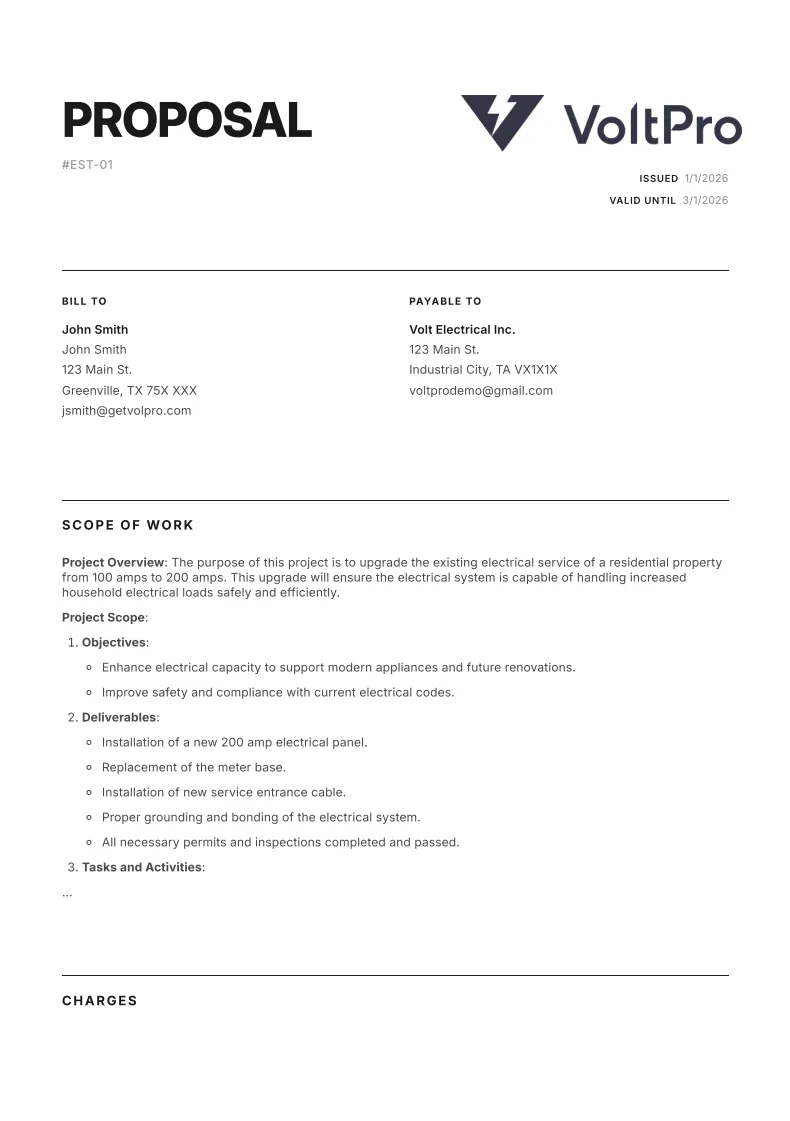
VoltPro shows your margin in real time as you build and sends a professional proposal PDF when you're done. No copy-paste required.
Try VoltPro freeThe real workflow: where the handoff goes wrong
You calculate job costs and markup in a spreadsheet. On larger projects, those numbers come from quantities counted during a takeoff. Once the numbers are solid, you open a Word document or Google Sheet, manually copy the line items over, write the scope of work from scratch, and download it as a PDF to email to the customer or GC.
That’s the standard workflow. And every step of that handoff is where problems happen.
Scope language written from scratch every time is inconsistent and often too vague. “Provide and install electrical per plans” tells the GC nothing about what’s included or excluded. Numbers copied manually get entered wrong. A $4,500 labor line becomes $45,000. A line item gets missed entirely.
Proposal software eliminates that handoff. Instead of copying numbers from a spreadsheet into Word, you import the spreadsheet directly. VoltPro reads the line items, organizes them into an estimate, and generates a professional branded PDF. No copy-paste. No rewriting scope from scratch. The document looks like it came from a company that knows what it’s doing.

What a GC or customer expects to see in your proposal
This is the part that gets missed in almost every guide about proposal software. Nobody explains what’s actually on the other side of the email.
A GC receiving proposals from three or four electrical subs is comparing documents. They are evaluating whether your scope matches what the job requires, whether you’ve addressed exclusions clearly enough to hold you to them, and whether they can hand your proposal to their PM without an awkward call to clarify basic line items. A direct customer is evaluating whether they trust you with a significant job.
What they need to see:
- Company name, license number, and contact information. If it’s not there, the proposal doesn’t look legitimate.
- Project address and description. Confirm you’re pricing the right job.
- Itemized scope of work. Specific, not vague. Line by line, not “electrical per plans.”
- Material and labor broken out. Either as separate line items or clearly visible sections.
- Payment schedule. Deposit, milestone, final draw. Every commercial job should have one.
- Exclusions. What you are not doing is as important as what you are.
- Signature block. If there’s no place to sign, it’s not a proposal, it’s a quote sheet.
One more thing: the GC doesn’t need to see your margin. But you do. Check it before the proposal goes out, not after.
Most contractors know this list. What gets in the way is the friction of building that document every time from a spreadsheet. Proposal software makes the structure the default, not the exception.
Do you need estimating software, proposal software, or both?
This is where the confusion lives. It’s worth being direct about it.
Most electricians can run their business quite far without dedicated estimating software. McCormick and ConEst are serious tools built for serious volume: large commercial and industrial jobs bid from full drawing sets, with complex assemblies, alternates, and tight labor productivity modeling. If you’re bidding a $4M distribution center from blueprints, you need that. If you’re doing mid-size commercial projects from a site walk and job history, a spreadsheet handles the math just fine.
But proposal software has urgency from the first job you ever bid. The proposal is what your customer or GC actually receives. The spreadsheet never is. Getting the numbers right and sending a document that looks like a rough draft are two separate failures. They just happen at different stages.
The decision framework:
- You’re doing large commercial or industrial takeoffs from blueprints, counting symbols, using labor unit libraries: Get estimating software first. Use it to generate your cost. Then use proposal software to send something professional.
- You’re doing mid-size commercial work from site walks and experience, building estimates in a spreadsheet: Proposal software is all you need right now. Bring your spreadsheet numbers, send a professional proposal, protect your margin.
- You need both: Use them in sequence. Estimating tool handles the takeoff and cost calculation. Proposal software handles the document the client receives.
The mistake is buying an enterprise estimating tool when what’s actually costing you jobs is the PDF you’re sending after the estimate is done.
The PDF is where jobs are won or lost. VoltPro handles that step.
Start your first proposalWhat to look for in electrical proposal software
Generic advice on this topic is everywhere. Here’s what actually matters for commercial electrical work specifically.
Does it understand how commercial electrical proposals are structured? Material and labor as separate line items, allowance items for work that can’t be fully scoped yet, and a clean scope of work section. If the software doesn’t know what an allowance line item is, it’s a generic document tool with a template.
Can you see your margin before you send? This is non-negotiable. According to CFMA’s 2024 Construction Financial Benchmarker, specialty trade contractors average 6.9% net income before taxes. That margin is thin enough that one proposal with a missed labor burden calculation can flip a job from a modest profit to a loss. Your margin should be visible as you build, not revealed after you’ve submitted.
Can you reuse scope language without writing it from scratch? The hours spent rewriting the same scope of work for similar jobs are hours that add up. Good proposal software saves scope sections, terms, and line items so you can reuse them across jobs without starting from scratch.
Does it produce a PDF a GC will take seriously? Your logo, your company details, consistent formatting, clean layout. The proposal is a first impression. Software that produces a polished PDF consistently is worth the cost.
Can you bring your existing spreadsheet? The best entry point for most contractors is not rebuilding their estimating workflow. It’s importing what they already have. Proposal software that requires a full catalog setup before you can send anything is the wrong starting point.
Next Steps
If you’re doing commercial electrical work and still copying numbers from a spreadsheet into Word, the proposal software question is already answered. The only step left is finding the right tool.
VoltPro is built for exactly this workflow: bring your spreadsheet, import the line items, see your margin, send a professional PDF. No catalog setup required to get started.