
VoltPro vs Word
The estimate builder for electrical contractors vs. a blank document you format by hand.
Your estimate is done. Turn it into a branded proposal without fighting margins, logos, and page breaks in Word.
Opens ChatGPT in a new tab.
Side-by-side split. Left, a real Word document mid-edit: logo nudged off-center, a broken page break pushing the signature line to page 3, filename visible as Proposal_FINAL_v3_useTHIS.docx. Right, the same job as a VoltPro branded proposal: clean layout, logo placed correctly, signature block on the last page.
Quick answer
Choose VoltPro if you build your numbers in a spreadsheet or by hand and want every proposal branded and consistent without touching Word's margins and logo placement again.
Word is fine for a one-off letter or a quick T&M memo.
Most electrical contractors sending bids to GCs or commercial clients every month choose VoltPro. The document should match the quality of the bid.
How they compare
What you get with each
| Word / Google Docs | VoltPro | |
|---|---|---|
| Branded layout applied automatically | Manual. Rebuild margins, logo placement, and fonts every time | Automatic. Logo, scope, line items, and terms every time |
| Consistent formatting across proposals | Depends on memory and discipline | Every proposal, identical layout, no exceptions |
| Signature block | Type "sign here" and hope it holds its place | Built into every PDF automatically |
| Version control | Proposal_FINAL_v3_useTHIS.docx | Every version saved, named, and searchable |
| Import your existing numbers | Retype or copy-paste from your spreadsheet | CSV import. Your line items become the proposal |
| Profit visibility before you send | None. Word doesn't do math | Real-time margin shown as you build |
| Change orders | Duplicate the doc, edit, hope you tracked what changed | One click. New PDF with change log, original alongside |
| Searchable proposal history | Buried in folders and sent-mail | Every proposal searchable by job, client, and date |
| Mobile formatting | Breaks. Margins and page breaks shift on a phone | Full workflow on phone: build, review, send |
| Time to send one proposal | 20 to 40 minutes fighting formatting | Minutes. Formatting is already done |
| Cost | Free, or bundled in Microsoft 365 | From $0. Paid plans from $29/month, flat |
Branded layout applied automatically
- Word / Google Docs
- Manual. Rebuild margins, logo placement, and fonts every time
- VoltPro
- Automatic. Logo, scope, line items, and terms every time
Consistent formatting across proposals
- Word / Google Docs
- Depends on memory and discipline
- VoltPro
- Every proposal, identical layout, no exceptions
Signature block
- Word / Google Docs
- Type "sign here" and hope it holds its place
- VoltPro
- Built into every PDF automatically
Version control
- Word / Google Docs
- Proposal_FINAL_v3_useTHIS.docx
- VoltPro
- Every version saved, named, and searchable
Import your existing numbers
- Word / Google Docs
- Retype or copy-paste from your spreadsheet
- VoltPro
- CSV import. Your line items become the proposal
Profit visibility before you send
- Word / Google Docs
- None. Word doesn't do math
- VoltPro
- Real-time margin shown as you build
Change orders
- Word / Google Docs
- Duplicate the doc, edit, hope you tracked what changed
- VoltPro
- One click. New PDF with change log, original alongside
Searchable proposal history
- Word / Google Docs
- Buried in folders and sent-mail
- VoltPro
- Every proposal searchable by job, client, and date
Mobile formatting
- Word / Google Docs
- Breaks. Margins and page breaks shift on a phone
- VoltPro
- Full workflow on phone: build, review, send
Time to send one proposal
- Word / Google Docs
- 20 to 40 minutes fighting formatting
- VoltPro
- Minutes. Formatting is already done
Cost
- Word / Google Docs
- Free, or bundled in Microsoft 365
- VoltPro
- From $0. Paid plans from $29/month, flat
Stop fighting margins and logos at 9pm.
Word was never built to hold a repeatable proposal layout. Every job means nudging the logo, fixing a broken page break, and matching last week's formatting from memory.
- Logo, scope, line items, signature block. Set once, applied every time.
- No hunting for last week's file to copy the formatting.
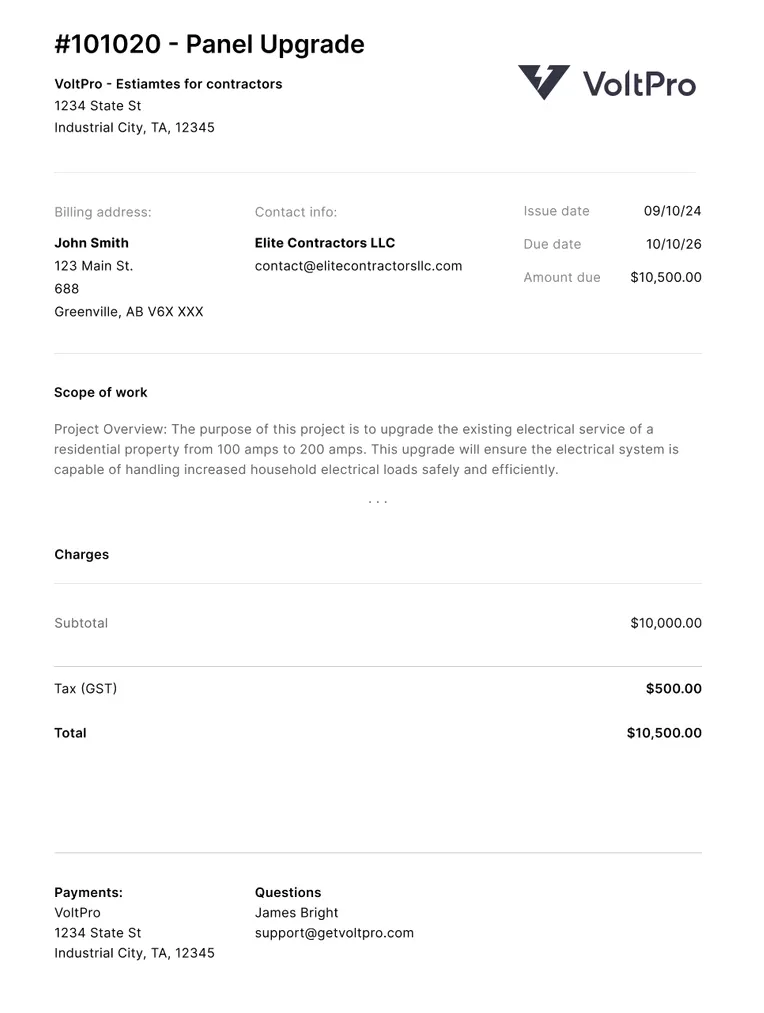
Never dig through "FINAL_v3_useTHIS.docx" again.
Word has no real version control. Every revision is a new file and a new risk of sending the wrong one.
- Every version saved, named, and searchable automatically.
- Change order? One click generates a new PDF, original alongside it.
Know your number before you format anything.
Word can't calculate margin. By the time the proposal looks right, nobody's rechecked the math underneath it.
- Real-time margin shown as you build, or right after your spreadsheet imports.
- The number in the document is the number you intended.
How it works
From spreadsheet to sent proposal in three steps.
Step 1
Import your estimate
Bring your existing estimate or build it right in VoltPro.
Step 2
Generate a professional proposal
A branded PDF with your logo, scope, and terms. Client-ready in minutes.
Step 3
Every bid, right where you left it
Every bid saved. Profit tracked. Your next estimate starts faster than the last.

An honest take
When Word is still the right call
Word still makes sense if:
- It's a one-off letter to a client you've worked with for years, never a formal bid.
- A quick T&M memo confirming a small change, nothing that needs a scope of work or a signature block.
- You send a proposal once or twice a year and formatting isn't costing you anything yet.
Sending proposals to GCs, property managers, or new commercial clients even once a month? The Word doc is costing you a first impression you don't get back.
I'm a lot more confident sending bids now. Before VoltPro I was using a Word doc template and it looked rough. Now every proposal looks a lot more professional.
Common questions
Related
-
VoltPro vs Spreadsheets
The math side: import the CSV, see your profit, keep the spreadsheet.
-
Electrical contractor software
The full picture: estimates, proposals, and prices that stay current.
-
Free electrical quote template
A professional client-facing quote template for Excel and Google Sheets.
-
Estimating software vs proposal software
Why the document falls short after the number is built.
-
Free electrical job pricing calculator
Work backward from your margin to the bid price that protects your profit.
-
Markup and margin calculator
See your real margin and what stays in your pocket on every job.
Your estimate is done.
Stop reformatting it.
Start free. No credit card. Your first proposal in minutes.
Start freeStill building the estimate itself? See VoltPro vs Spreadsheets →