

We’re excited to share some powerful new features we’ve added to VoltPro to make the estimate creation experience even better:
Updated Estimate Editor
We’ve completely overhauled the editor to give you more power and speed. Here’s what you can do with it:
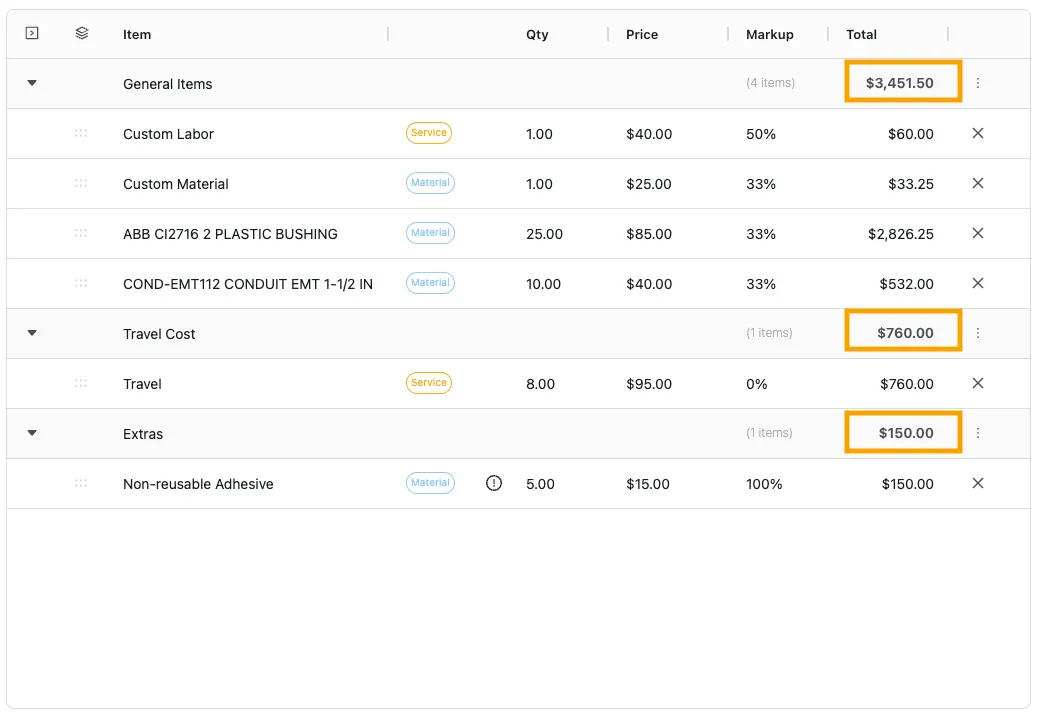
Realtime Section Totals
As you add materials and labor, each section (e.g., “Rough-In”, “Labor”, “Extras”) now displays a running subtotal for all items in that section. No more manual math or guesswork.
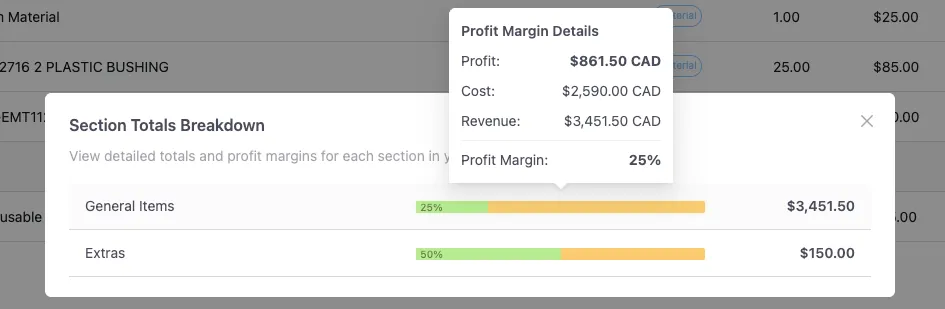
Know Your Profitability by Section
A new breakdown view shows you the cost and profit margin for each section of your estimate.

Re-order with Drag-and-Drop
Entire sections can be re-ordered within the items table. Click the ‘stack’ icon on the top left of the table header to toggle ordering mode. Drag sections then click the same icon to toggle back to the regular editing mode.
Never Lose Your Work
The new editor automatically saves your progress as you build. Refresh the page or close the tab—your estimate will be safe and sound.
Other updates
We’ve also made these additional updates for a better overall experience:
-
Added section totals to the estimate detail view
-
Updated our onboarding experience for new users
-
Improved performance loading large estimates with many line items
-
Fixed various bugs and small issues
This update is already live! The next time you create or edit an estimate, you’ll automatically be using the new, more powerful editor.
Have questions or suggestions? We’d love to hear from you! Email us directly at support@getvoltpro.com. Our team is actively developing features based on feedback from users like you.
More updates soon.