


You type something into ChatGPT. Get a vague, generic answer. Close the tab. Most electricians who’ve been through that have written the tool off entirely, and honestly, it’s hard to blame them. The output wasn’t useful.
But here’s where it gets interesting. The problem usually isn’t the tool. When you type “how do I write a scope of work?” the same way you’d type it into Google, you get the same kind of result you’d get from Google: broad, surface-level, not built for anyone in particular. That’s not an AI problem. That’s a Google habit leaking into how most people use AI, because it’s the habit they already have.
The guys who’ve figured it out treat it more like a conversation with someone who knows a lot but needs context before they can be useful. AI can’t understand the way you and I can; it only matches patterns on the data it has. So when you ask a vague question, you get a vague answer. Give it a real situation: the job type, the customer, information about your business, the specific thing you’re trying to write or figure out. Be specific. The quality of what comes back changes completely. Some electricians on Reddit put it well: they learned to ask the right questions and they were kind of amazed. That’s usually how it goes.
This guide is built around that distinction. It covers the tools worth your time in 2026, why most AI tool lists miss the point, and the one skill that makes all of it actually useful: knowing how to ask.
Key Takeaways
- Most electricians get weak AI output because they use it like Google: short, no-context queries produce generic answers.
- The fix is prompting, not the tool. Give the AI a role, give it context, and refine across a few turns instead of expecting one shot to land.
- ChatGPT, Claude, or Gemini handle the writing: scopes of work, client emails, T&Cs, change order descriptions, and rough field notes turned into clean updates.
- Wispr Flow captures job site notes by voice, so getting context-rich input into AI never means typing at a keyboard.
- AI call-answering tools catch the calls you miss on a job, and STACK speeds up plan takeoff if you bid from blueprints.
- VoltPro reads your vendor invoices to keep materials pricing current, then turns your finished estimate into a professional, branded proposal.
- The tools are secondary to the skill, and Zapier ties them together once you’re comfortable. Learning to prompt well is what makes any of them useful.
Why Your First AI Experience Probably Didn’t Go Well
Almost every contractor who’s had a bad experience with AI hit the same wall: the tool wasn’t the problem. The input was.
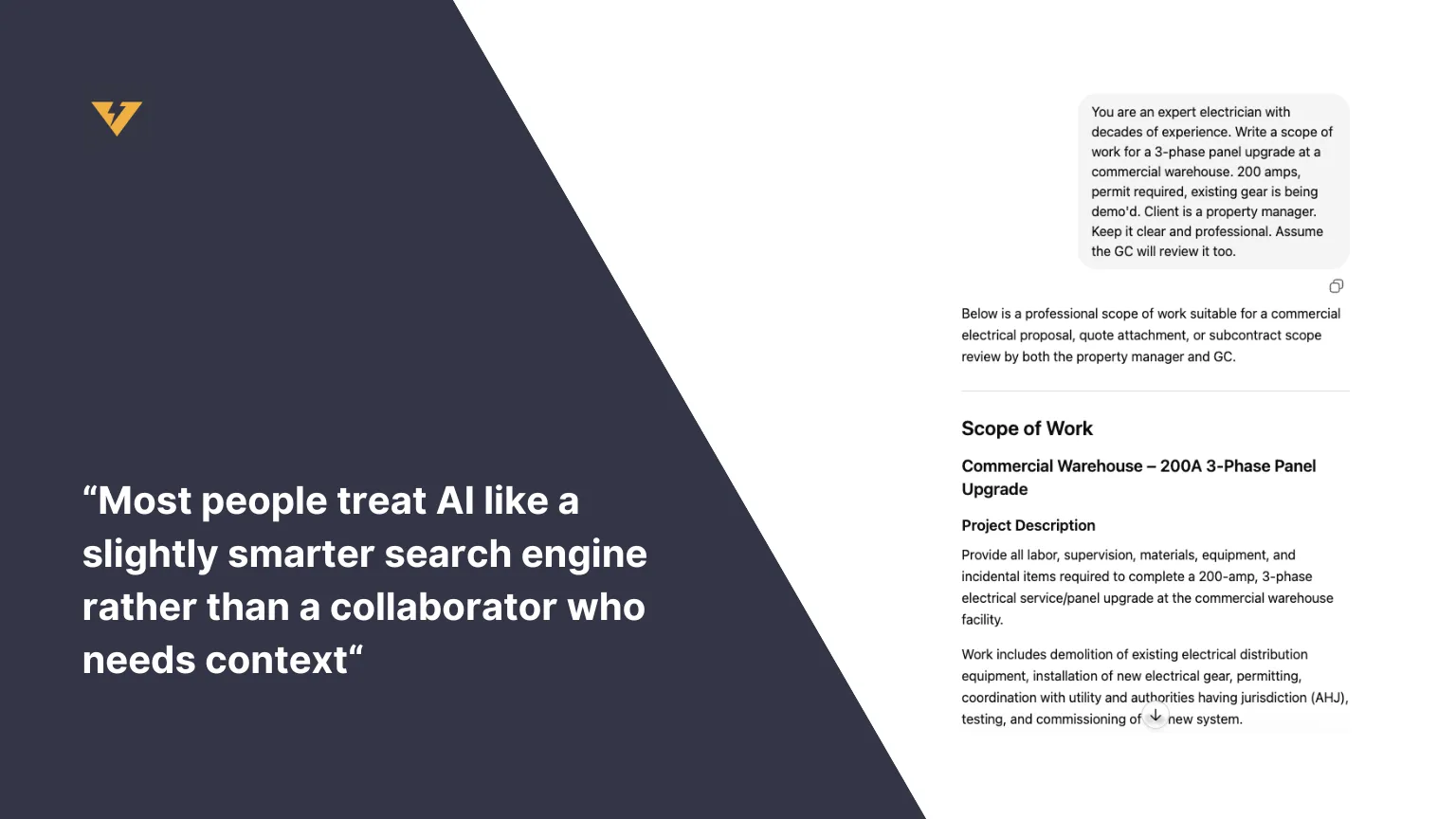
Ethan Mollick, a Wharton professor who has spent years studying how people actually use AI at work, describes this gap consistently: most people treat AI like a slightly smarter search engine rather than a collaborator who needs context.[1] The tool can only work with what you give it. A vague question produces a vague answer.
The fix is specific. Before you ask AI to write anything for you, do three things:
- Assign a role. “Act as a commercial electrical contractor with 15 years of experience estimating industrial and commercial jobs.”
- Give it context. What’s the job type? What’s the client situation? What format do you need? What’s the scope?
- Refine, don’t restart. When the first draft isn’t right, respond to it. “Make the scope shorter.” “Add a section on permit responsibility.” “That’s too formal. Write it like I’d say it in an email.”
That third step is where contractors leave the most on the table. They get one mediocre output, give up, and call the whole thing useless. The contractors who get real value out of AI are the ones who iterate. The first response is a rough draft, not a finished product.
According to the AGC’s 2026 construction outlook, 61% of construction firms now use AI or plan to increase their investment in it.[2] But the Dodge Construction Network found that 87% of contractors believe AI will transform their business, while only 19% have actually adapted their workflows to use it.[3] The gap isn’t awareness. It’s knowing where to start.
That’s the gap this post is trying to close.
The Four Prompting Patterns Worth Knowing
MIT Sloan breaks AI prompting into four patterns that cover nearly every use case.[4] Here they are, translated for a contractor actually doing commercial electrical work.
| Pattern | What it does | Contractor example |
|---|---|---|
| Zero-shot | A direct command with full context, no examples needed | ”Write a scope of work for a 200-amp 3-phase panel upgrade at a commercial warehouse, permit required, existing gear being demo’d.” |
| Few-shot | Show examples of your style and ask AI to match it | ”Here’s how I write my T&Cs: [paste]. Write a new version covering material price escalation.” |
| Instructional | Spell out the format, length, and tone you want | ”Summarize this job scope in 3 bullets, under 50 words, in plain job-site language.” |
| Role-based | Assign domain expertise so the output is grounded | ”You are a commercial electrical estimator. Review this scope and flag anything that could become a change-order dispute.” |
Zero-Shot: Direct command with full context
No examples needed. Just a clear, specific instruction. This is where most contractors under-deliver.
Write a scope of work for a panel upgrade.
Write a scope of work for a 3-phase panel upgrade at a commercial warehouse. 200 amps, permit required, existing gear is being demo'd. Client is a property manager. Keep it clear and professional. Assume the GC will review it too.
The second version has context. AI can actually do something useful with it.
Few-Shot: Give examples of what you want
Paste in a sample of how you normally write, and ask AI to match it. This is the fastest way to get output that sounds like you.
Here's how I usually write my T&Cs: [paste your existing T&Cs]. Write a new version that covers [specific scenario you don't have language for yet].
Instructional: Explicit constraints
Tell it exactly what you want the output to look like. Format, length, plain language versus formal. All of it.
Summarize the following job scope in 3 bullet points. Under 50 words total. Plain language. Write it like you're telling someone on a job site what needs to happen.
Role-Based: Assign domain expertise
Give the AI a specific authority to act from. This produces more technically grounded output for tasks like reviewing scope or flagging what’s missing.
You are an experienced commercial electrical estimator. Review the following scope of work for anything I might have missed. Flag ambiguous language that could turn into a change order dispute.
These four patterns cover 90% of what a contractor will use AI for. Learn them once and they transfer to every tool and every task.
Start Here: What ChatGPT and Claude Can Do for an Electrician Today
The two tools worth starting with are free, available right now, and require nothing to set up.
There are three general-purpose AI tools worth knowing: ChatGPT, Claude, and Gemini. All three are free to start. All three handle writing tasks, drafts, rewrites, and back-and-forth conversation. The differences between them matter less than learning to use any one of them well.
That said, they’re not identical. ChatGPT is the most widely known and handles most contractor tasks well. Claude tends to stay more consistent on longer documents: full scopes of work, multi-section T&Cs, anything that runs more than a few paragraphs. Gemini integrates tightly with Google Workspace if you already live in Google Docs and Gmail. Pick one, get comfortable with it, and know that the prompting principles in the section above transfer to all three. As you use each model, you will get a sense for which tool gives the best results for a particular task. Many people who use AI regularly are running multiple LLMs at the same time.
Here are the tasks worth trying first, with prompts you can copy and paste.
Writing a scope of work
You are a commercial electrical contractor with 15 years of experience on industrial and commercial jobs. Write a scope of work for the following project: [describe the job, client type, key equipment, permit status, anything that affects scope]. The scope should be clear, organized by task, and professional enough to attach to a proposal going to a GC.
Responding to a slow-pay email
I have a commercial client who is 45 days past due on a $12,000 invoice. I've sent one reminder and haven't heard back. Write a firm but professional follow-up email that makes clear I need payment and that I'm prepared to pause scheduled work if this isn't resolved in 5 business days. My tone is usually direct but not aggressive.
Writing a change order description
Write a professional change order description for the following scope addition: the GC asked us to add a dedicated 20-amp circuit for the break room after rough-in was already complete. We had to open a finished wall, run 40 feet of MC cable, add a breaker, and patch the wall opening. Write a clear, factual description I can submit to the GC with my change order. Keep it specific and avoid vague language.
Turning field notes into a client update
Clean up the following rough field notes and turn them into a short, professional job status update I can send to my client contact. [Paste your notes.] Keep it under 150 words.
One Caveat Worth Knowing About AI and NEC Code
Other AI tools posts recommend ChatGPT for NEC code lookups without caveats. This one won’t.
AI generates confident, plausible-sounding answers about specific NEC articles, code sections, and inspection requirements. A meaningful number of them are wrong or outdated. This isn’t a knock on the technology. It’s just a limit of how language models work. They’re trained to produce coherent text, not to verify verbatim against a code book. Always double check AI output.
Use AI to get a plain-English explanation of what a code section generally covers, to understand the concept behind a requirement, or to draft a question to bring to your AHJ. Do not use it to confirm whether a specific installation method is code-compliant. Check the actual code book for anything that matters.
On the Job Site: Wispr Flow for Voice Capture
The biggest barrier between most contractors and AI isn’t the technology. It’s the typing.
Contractors are on job sites all day. They’re not at a keyboard. Getting the kind of context-rich input that produces useful AI output requires describing a job, a situation, or a scope in some detail. Typing all of that on a phone after a full day of work is friction most people won’t push through.
Wispr Flow solves this. Dictate a job site walkthrough into your phone, and the transcription feeds directly into an AI tool for refinement.
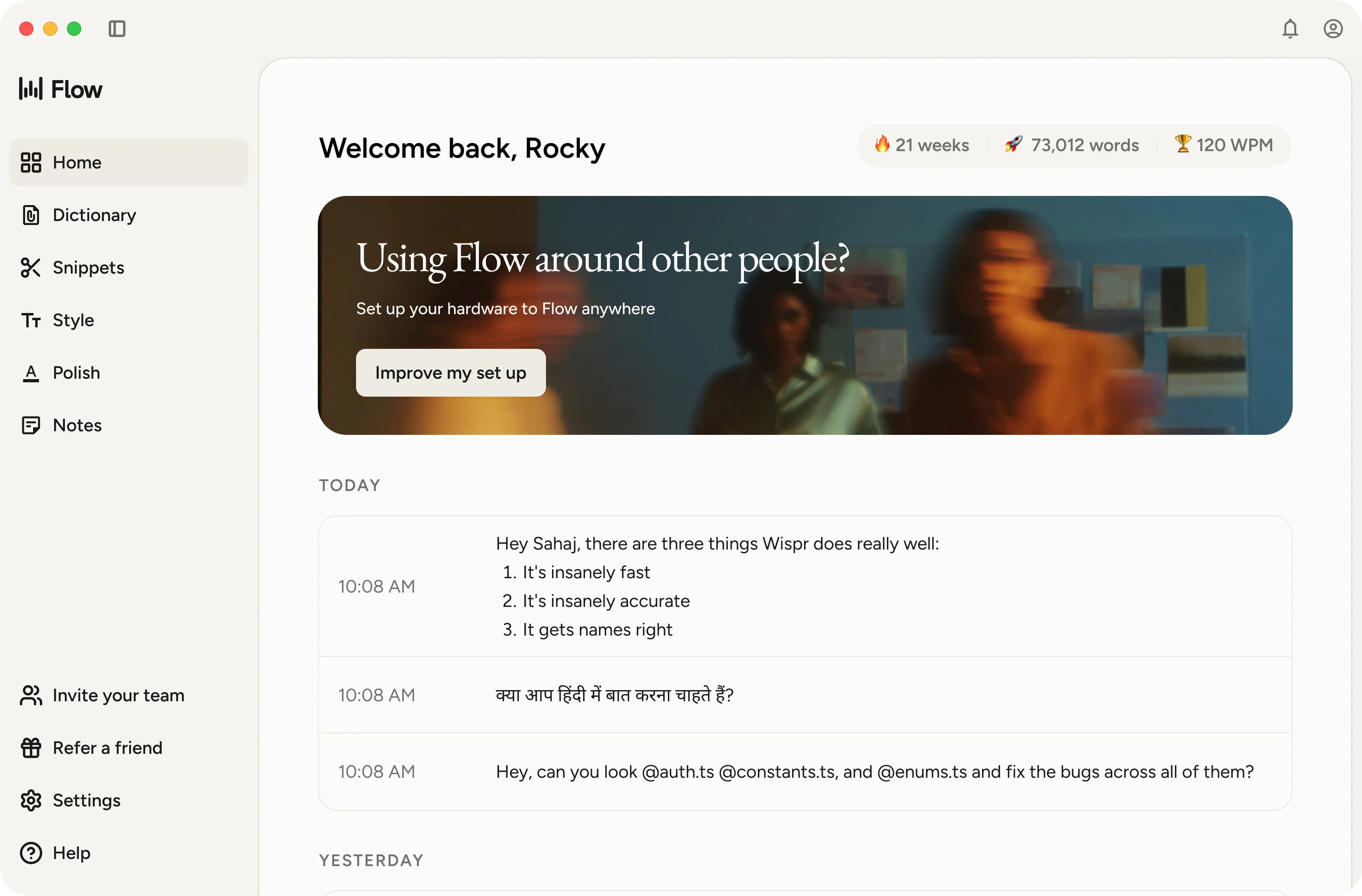
“Walked the service entrance, 200-amp main, existing panel is packed and showing corrosion, customer wants to add EV charger and panel upgrade, also asked about backup generator hookup, timeline is tight, GC says they want it done before the tenant moves in next month.”
That took 20 seconds to dictate. Feed it into ChatGPT or Claude with the right prompt and you have a draft scope of work in another 30 seconds. Dictate walkthrough notes, paste the transcription into AI, ask for a scope, a client update, or a change order summary. No desk required.
Missing Calls While You’re on a Job: AI Answering Tools
For a solo shop where the owner is the only one who picks up the phone, a missed call at 4:30 on a Friday is work going to whoever answers next.
AI phone answering has gotten genuinely good. Tools like Smith.ai, Goodcall, and NextPhone answer calls 24/7, capture lead information, handle basic scheduling questions, and route urgent situations appropriately. NextPhone in particular is tuned for trades. It recognizes terminology like panel upgrades and understands that “sparking” is urgent in a way a generic answering service doesn’t.
This category isn’t for every contractor. If you primarily work repeat commercial accounts and aren’t chasing inbound residential leads, the math is different. But if you’re missing calls during jobs, the ROI on an AI answering service tends to be straightforward.
AI for the Estimating and Proposal Workflow
Most AI tool lists blur three different jobs into one category. Takeoff, estimating, and proposal creation are not the same thing. The right tool depends on which step you’re actually in.
If you work from blueprints: STACK
For contractors who do plan takeoff, STACK is a construction estimating platform with AI-assisted symbol detection. It identifies and counts electrical fixtures and devices from uploaded plans rather than manually tracing them. It covers multiple trades, not electrical exclusively, which makes it more of a cross-trade tool than a purpose-built electrical solution. But it’s established, maintained, and does what it claims.
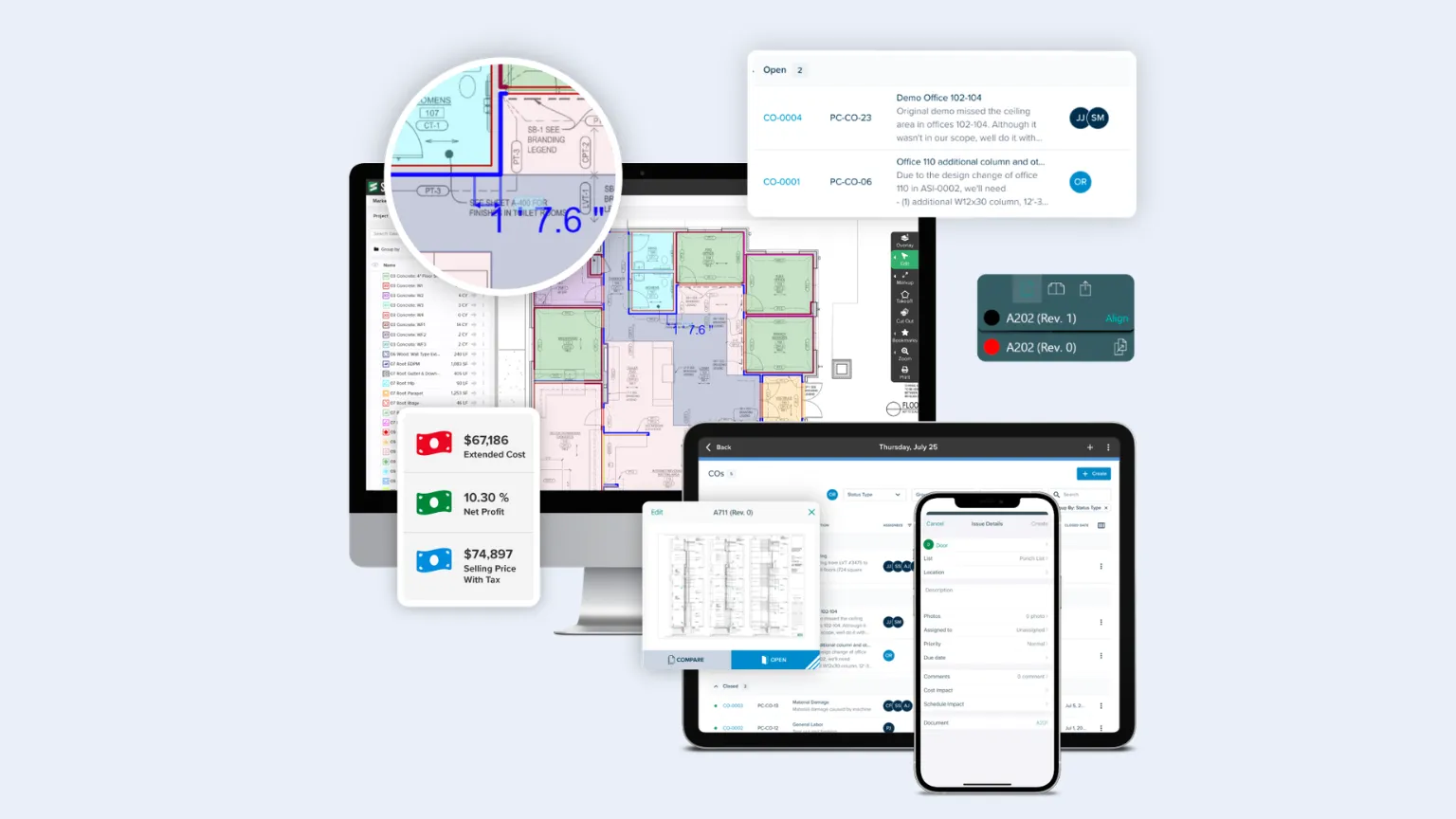
Honest caveat: AI takeoff is still maturing. Contractors who’ve tried it report mixed results depending on plan quality and complexity. It compresses time on clean, straightforward sets. On messier plans, you’re still checking the output carefully. Use it as a starting point, not a finished count.
If you don’t work from plans, if you scope by site walkthrough or spreadsheet, this step isn’t in your workflow and you can skip straight to the next one.
Building the estimate: your process still works
This is where most contractors’ existing process already works. The spreadsheet refined over five years, the template they know by heart. The part that tends to drift: materials pricing. Most contractors are working from memory or list price, both of which lag what you’re actually paying by the time the job runs.
VoltPro has a specific AI feature built around this. Forward a vendor invoice to VoltPro or upload the PDF, and it reads every line item and matches it against your materials catalog automatically. Obvious matches confirm on their own. Uncertain ones get flagged for your review. The more invoices you run through it, the better it gets at recognizing each supplier’s line items. Your catalog prices reflect what you’re actually paying, not what you remembered from six months ago.
If you want to build the estimate inside VoltPro directly, the estimate builder is there. If your spreadsheet works, import it. The goal is accurate pricing in your catalog, not a new workflow.
According to NECA’s 2024 Profile of the Electrical Contractor, 51% of electrical firms have 1-9 employees.[5] These are contractors who built their estimating process from experience, not from software. The right tool meets them where they are.
VoltPro's invoice AI prices every estimate off what you actually pay.
Forward a vendor invoice and VoltPro reads each line and updates your catalog prices automatically. Import the spreadsheet you already use.
Try VoltPro free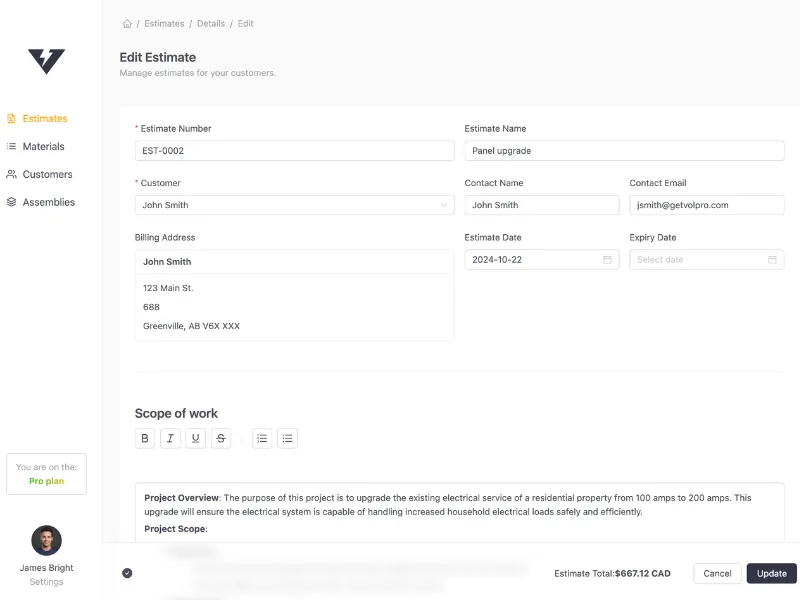
Turning your estimate into a proposal: VoltPro
This is where VoltPro lives.
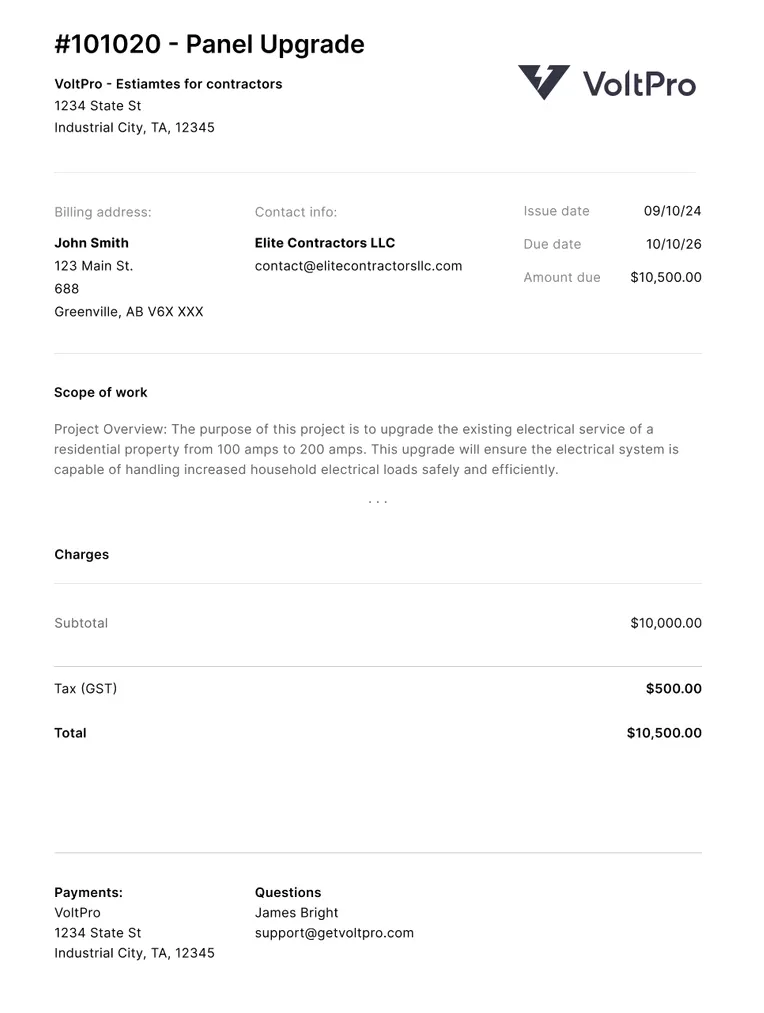
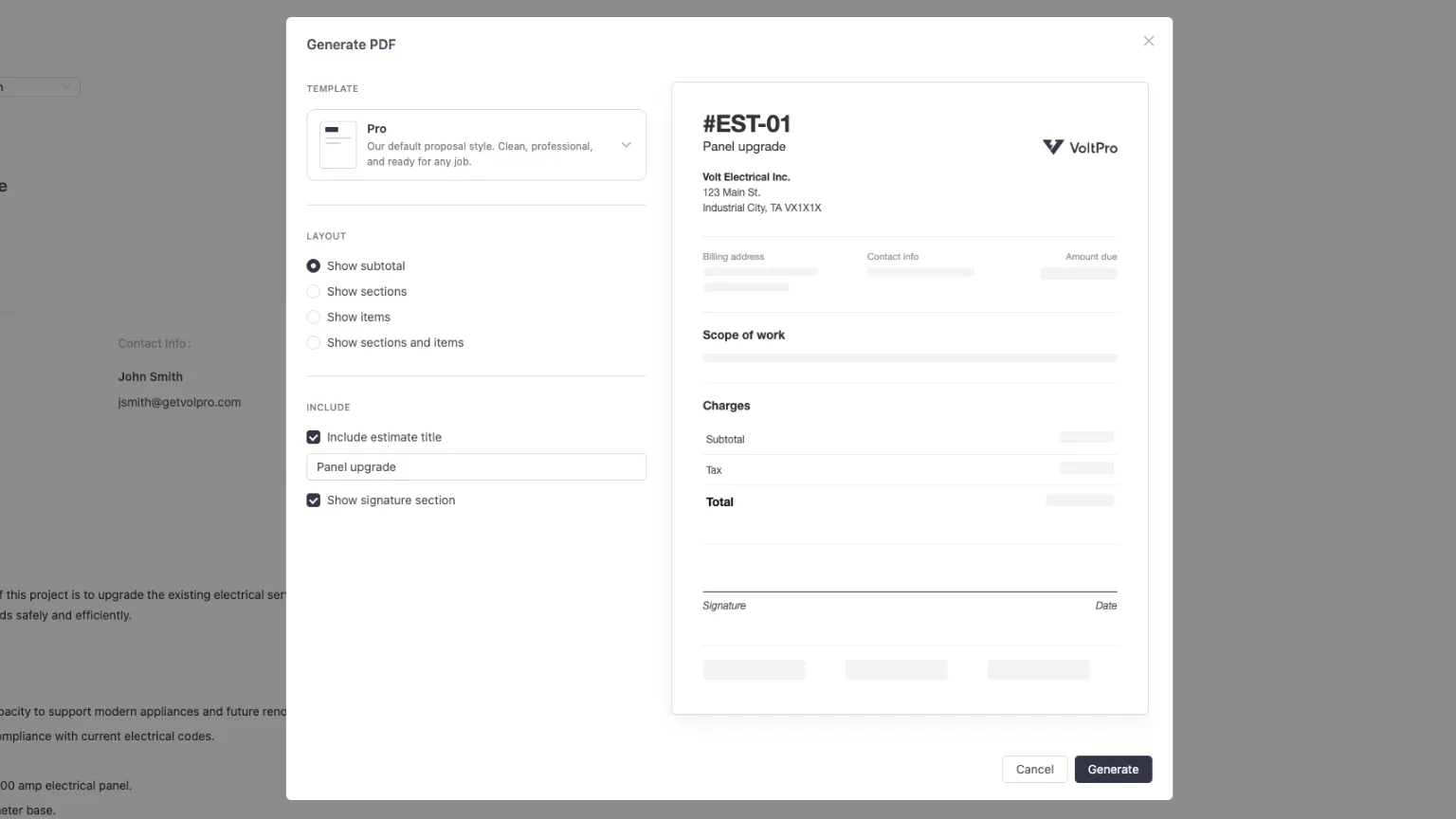
Bring the numbers you already have, from a spreadsheet, a CSV, or built natively in VoltPro, and the output is a professional, branded proposal ready to send. Your logo, your layout, your T&Cs, line items organized by section, a clear total. Not a Google Doc export or a re-keyed QuickBooks quote. A proposal that matches the quality of the work you’re putting in the ground.
From that first proposal, the full workflow is available: change orders, project summaries, searchable history of every estimate. A contractor can go from spreadsheet to send in a single session.
NECA data shows 16.7% of electrical firms with 1-4 employees use BIM, versus 81% for firms with 100+ employees.[5] The technology gap between small shops and large firms is real across every category. VoltPro is built for the shop that doesn’t have a project manager or admin. The contractor who estimates, builds, and sends is doing all three jobs.
The One Habit That Makes All of This Work
AI generates plausible text, it isn’t always accurate text. Those aren’t the same thing, and the gap matters before anything goes in front of a client or a GC.
Build this habit from day one.
Read it yourself before it goes out. AI writes a first draft. You are the licensed professional signing off. If the scope misses a permit requirement or the T&Cs describe something your license doesn’t cover, that’s on you. Read the output the way your client will read it.
Never trust AI on code compliance. NEC questions, inspection requirements, specific installation methods: confirm against the actual code book or your AHJ. Plausible-sounding AI output on code questions has a documented failure rate.
Watch what you paste in. Customer names, job addresses, private contract terms, and pricing details don’t belong in a public AI window if your client hasn’t consented to that. Most free AI tiers use inputs to improve their models. If data privacy matters for a specific job, use a business-tier account with no training on your inputs.
Ethan Mollick, whose research on practical AI use is among the most cited in the field, frames this consistently: AI is a collaborator, not an authority.[1] Treat it that way and it’s genuinely useful. Treat it as a source of truth and you’re taking on risk.
One More Tool Worth Knowing: Zapier
Zapier connects apps together so they can talk to each other automatically. No code, no developer. You set up a trigger (“when X happens”) and an action (“then do Y”). The free tier covers basic workflows. The paid tier handles more complex ones.
Here’s what that looks like for a contractor:
- A new lead fills out a form on your website, and Zapier automatically sends them a text within 60 seconds. No one checking email after hours. No lead going cold overnight.
- You complete a job in your scheduling app, and Zapier triggers a follow-up email asking for a Google review. Happens automatically, every time, without you remembering to do it.
- You dictate job notes in Wispr Flow, and Zapier routes the transcript to a Google Doc organized by job. Your site visit notes in one place without touching a spreadsheet.
None of this requires custom software or a technical background. Most contractors who’ve set up a Zapier workflow describe it as a few hours of setup that saves them 30 to 60 minutes a week indefinitely.
Getting comfortable with ChatGPT or Claude for writing tasks, and getting proposals out through VoltPro, is a full week’s worth of actual value. Add Zapier once you’re there. It’s the layer that starts connecting everything.
Next Steps
If you haven’t tried any of these tools yet, start with ChatGPT or Claude on a task you do every week. Writing a scope of work, responding to a client question, turning field notes into a status update. Use the Role-Based or Zero-Shot prompting patterns from the section above, give it real context, and see what comes back.
Once you’ve got a handle on the general AI tools, look at where your estimate workflow ends and your proposal workflow begins. If that gap is a converted spreadsheet or a Word doc that looks rough by the time it reaches a commercial client, VoltPro is a fast on-ramp. Bring the spreadsheet you already have. The proposal comes out professional.
The tools are all available this week, most of them free to start. Nobody’s handing anyone a finished system. The ones getting value from this are just the ones who started.
References
- [1] Ethan Mollick, “Using AI Right Now: A Quick Guide,” One Useful Thing.
- [2] Associated General Contractors of America, “Dampened Expectations: The 2026 Construction Hiring and Business Outlook” (January 8, 2026).
- [3] Dodge Construction Network, “AI for Contractors SmartMarket Brief” (December 5, 2025).
- [4] MIT Sloan Teaching & Learning Technologies, “Effective Prompts for AI.”
- [5] NECA, “2024 Profile of the Electrical Contractor” (July 16, 2024).